Testing OpenGraph on localhost from the CLI before you go public
I’ve been working on a few websites lately, mine and some client projects, and I keep hitting the same annoying loop around OpenGraph tags.
You add og:title, og:description, og:image to your layout, tweak the image, adjust the copy, and then you want to see what the card actually looks like before you share the link anywhere. The standard tools for this are the Facebook Sharing Debugger, the Twitter Card Validator, LinkedIn’s Post Inspector, and online previewers like opengraph.xyz. They all need one thing you don’t have yet: a public URL.
So you stand up a tunnel, or push to staging, or ship it to prod and iterate in the wild. None of that is great. Facebook’s debugger in particular caches aggressively, which means every half-finished version you feed it is now pinned to the URL you fed it. Iterate on a card that’s already partly live and you’re fighting the cache for hours.
I wanted to render an OpenGraph preview against localhost. So I built og-check, which ships as part of my CLI tool suite neutils.
What it does
og-check takes a URL, fetches it, pulls out the meta tags, and renders a preview directly in your terminal. Images included.
Here it is running against my own site while I was working on it locally:
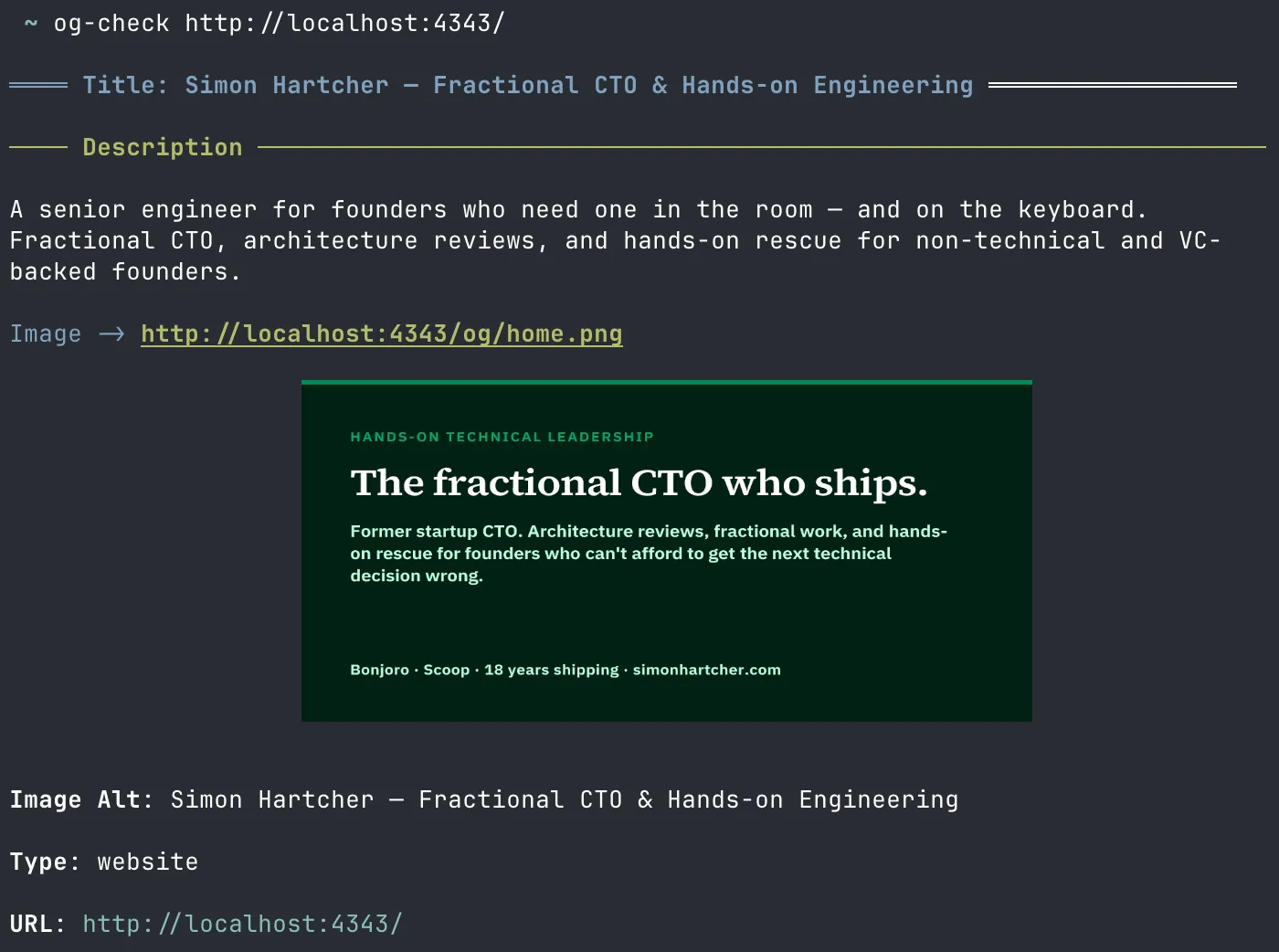
That’s the OpenGraph card for the homepage of this site, fetched from http://localhost:4343, rendered inline in Ghostty.
I’ve also been using it this week to check the OG tags on reclaimr.dev, a product I’m working on. Same loop: tweak the layout, save, run og-check against the local dev server, see the result. The feedback cycle is a few seconds instead of a few minutes.
Supported terminals
The inline image rendering uses the Kitty graphics protocol. That means it works in any terminal that speaks it. As of writing, that list includes:
- Kitty
- Ghostty
- WezTerm
- Konsole
- iTerm2
- Warp
- wayst
- st (with a patch)
- xterm.js (partial support as of early 2026)
I’ve only tested og-check in Ghostty myself. If you run it in another terminal on the list and something looks off, let me know.
If your terminal isn’t on the list, you still get the title, description, type, URL, and the image’s URL as text. You just don’t get the image rendered.
How it works
Under the hood it’s pretty simple:
- Fetch the URL using Zig’s
std.http.Client. - Scan the response for
<title>and every<meta>tag. Bucket them by namespace:og:*,twitter:*,article:*,music:*, and so on. - For each output format, build a markdown document in memory and hand it to zigdown, which renders markdown straight to the terminal, images and all. The exception is the JSON output, which skips zigdown entirely and writes the tags using
std.jsonfrom Zig’s standard library.
The inline image rendering happens inside zigdown. It downloads the image from the og:image URL and emits the Kitty graphics protocol escape sequences. Interestingly, it doesn’t query the terminal first to ask whether it supports the protocol. It just sends the escape codes and lets the terminal decide. Supporting terminals paint the image. Everything else silently drops the sequences and you see the plain-text fallback.
If you want to dig into the specifics, the og-check source is about 600 lines of Zig split across a handful of files.
Output formats
There are four output formats, selected with -o:
opengraph(default): a styled preview of theog:*fields.twitter: a Twitter Card preview, falling back toog:*fields when the matchingtwitter:*field is missing (which is how Twitter clients behave themselves).table: every meta tag grouped by namespace, as a markdown table.json: machine-readable, for piping into other tools.
# Rendered OpenGraph preview
og-check http://localhost:4343/

# Twitter Card preview
og-check -o twitter http://localhost:4343/

# Everything, as a table
og-check -o table http://localhost:4343/

# JSON, for piping
og-check -o json http://localhost:4343/ | jq '.og.image'
If a required field is missing (og:title, og:type, og:image, og:url), og-check writes the error to stderr and exits non-zero. Wire it into a CI step and you’ve got a smoke test for your layout templates.
Installation
og-check ships as part of neutils, so you have three options:
-
Grab pre-built binaries from the neutils releases page. Builds are available for Linux, macOS, and Windows, on x86_64 and aarch64. The release archive contains every tool in the neutils suite, including
og-checkon its own if you just want that one. -
Build from source. You’ll need Zig 0.15+:
git clone https://github.com/deevus/neutils cd neutils # Installs binaries into ~/.local/bin zig build install --release=small --prefix ~/.local -
Install using mise:
# Add this to your mise config
[tool_alias]
"neutils" = "github:deevus/neutils[asset_pattern='neutils-{{ version }}-{{ os }}-{{ x86_64_arch }}*']"
"og-check" = "github:deevus/neutils[asset_pattern='og-check-{{ version }}-{{ os }}-{{ x86_64_arch }}*']"
# Install all of the neutils CLI tools mise use -g neutils # Install only og-check mise use -g og-check
OpenGraph is not that hard to get right. But when it’s wrong, you’re either waiting on a deploy or paying for a tunneling service. Now I don’t have to do either.